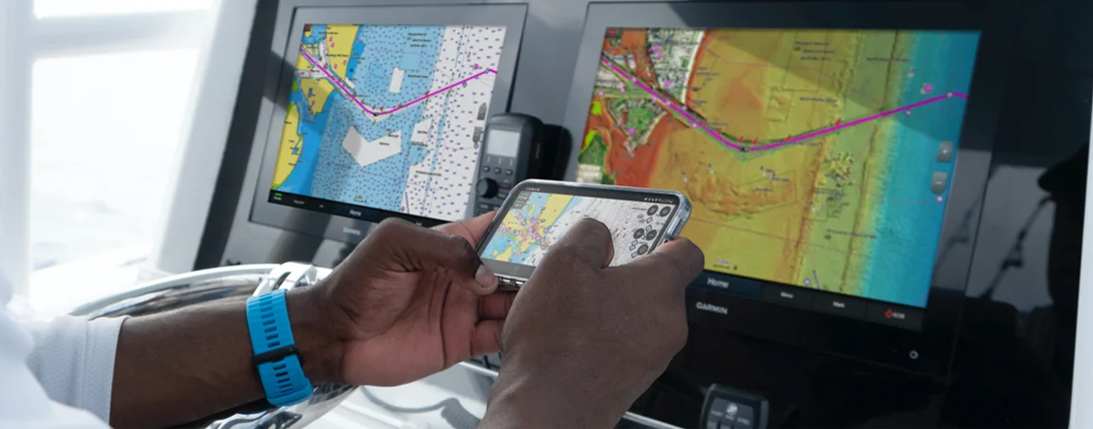
How to Choose the Right Chartplotter for Your Boat
There are several important things to consider when choosing a chartplotter for your boat. The type of boat strongly affects what you need: for example, a sailboat requires different information than a motorboat. Other key factors include price, ease of use, compatibility with your existing equipment and the physical size of the device.
The screen must be clearly visible while underway, but bigger is not always better. A screen that is too large can obstruct the helmsman’s forward view or get in the way when moving around the boat. If you have a small boat, you may not need all the functions of a larger, high-end plotter, such as radar or autopilot integration. Choose a model with the features that match your actual use.
Some units are designed specifically to work in a network with other devices, while others are simple standalone units. Make sure you also purchase a separate chart card that covers the waters where you use your boat.
Price is naturally an important factor in any major purchase. At Marinekauppa you can rely on getting the best possible offer on your chartplotter. However, it is not a good idea to “save” so much that you end up with a unit that does not match your needs or is not compatible with your existing equipment.
Explore Marinekauppa’s selection of chartplotters.
Networking Chartplotters with Other Devices
(Read more: Creating an NMEA 2000 Network)
There are different types of chartplotters:
-
Standalone chartplotters – basic units that only show charts. These are a good choice if you want an inexpensive chartplotter and do not need integration with other systems.
-
Multifunction displays (MFDs) – most modern units. They allow you to view and control other systems such as sonar, autopilot and AIS on the same screen.
In the latter case, the chartplotter is networked with other devices. The type of network depends on the equipment, but most modern systems use NMEA 2000. Some manufacturers still use their own connectors, even though the data on the network is NMEA 2000.
Building an NMEA 2000 network is relatively simple. The backbone is terminated at both ends, and various T-connectors and distribution blocks are added between. Power is supplied to the NMEA 2000 backbone roughly in the middle. Once all devices are connected, data is shared within the network and any compatible unit can read it.
Note that not all devices are NMEA 2000 compatible.
Explore NMEA 2000 accessories: NMEA 2000 – Marinekauppa
Ease of Use
Ease of use is another critical factor when choosing a chartplotter. There is no point in buying a model that is overly complicated and unpleasant to use—especially in rough conditions.
Many devices include tutorials or quick-start guides that help you learn the functions quickly. Most major manufacturers invest heavily in user experience, so their devices are generally intuitive and comfortable to operate once you are familiar with the basic menu structure.
Charts for Chartplotters
Most chartplotters today are compatible with Navionics marine charts. Among the major brands, only Garmin uses its own charts (Navionics Garmin).
Raymarine, Lowrance, Simrad, B&G and Humminbird all use Navionics charts:
-
Navionics EU050R SD/MicroSD – Finnish coastal waters
-
Navionics EU055R SD/MicroSD – Finnish inland waters
-
Navionics EU644L – Finland inland and coastal waters
Garmin units require different chart cards than other major brands:
-
Garmin+ 644L SD/MicroSD – Finnish inland and coastal waters
Navionics charts are very popular among boaters due to their clarity and readability.
Key Points When Choosing a Chartplotter
Here are the main things to consider when selecting a chartplotter for your boat.
1. Physical Size and Installation
You must ensure the device fits in the available space on the dashboard or console. Most units can be:
-
flush-mounted (built-in) or
-
mounted on a bracket
The biggest practical difference is theft risk and removability:
-
Flush-mounted units are typically left on the boat.
-
Bracket-mounted units are easier to remove and are therefore often taken home when leaving the boat, because they are more attractive and accessible to thieves.
The most common screen sizes for recreational boating are currently 7", 9" and 12". We recommend first choosing the right model and feature set, then selecting the most suitable size from that series. Screen size is rarely the first decision point.
2. Built-In Sonar or Not
Another important question is whether you want built-in sonar in your chartplotter.
-
Some models include the sonar module and a transducer as part of the package.
-
Others have internal sonar but require a separate transducer.
-
A few models do not support sonar at all.
Adding sonar typically increases the price of the unit by around 100 €. Transducers themselves range from a few tens of euros to several hundred, and the most advanced live-view transducers used by anglers can cost over 1,000 €.
Common transducer types:
-
Transom-mount transducers – most common on small, outboard-powered trailer boats.
-
Through-hull transducers – used when transom mounting is difficult or undesirable; common on sailboats.
-
In-hull (inside hull) transducers – useful when the hull is not too thick and is not a sandwich construction.
-
On wooden boats, the transducer housing must be bronze, so it does not get damaged when the wood swells and shrinks.
3. Networking and Compatibility
As mentioned above, many devices can be connected to each other via NMEA 2000. This is not possible with every model.
If your boat already has existing equipment that you would like to control or read via the chartplotter (for example, engine data, autopilot, AIS), you must consider networking and compatibility before buying a new unit.
Boats with several devices often already have a network installed. It is wise to discuss network planning and device connections with a professional to ensure reliable operation.
Example: radar data is not sent over NMEA 2000. Radar usually requires its own Ethernet-type connection to the display.
Read more about networking: Creating an NMEA 2000 Network – Marinekauppa
Features and Functions
Core navigation functions are quite similar across brands:
-
Route planning and waypoint creation
-
Adjustable chart orientation (north-up or course-up)
-
Split screen – for example, chart on one side, sonar on the other
Where brands and models differ more is in additional features and expandability:
-
Some do not support radar or autopilot at all
-
Others can control bow thrusters or trolling motors
-
Some can display thermal camera images
-
Many now offer multimedia options, such as apps for streaming services (for example, Raymarine Axiom includes apps like Netflix and Spotify; you still need your own account for these services)
Manufacturers increasingly aim to improve comfort and convenience for all types of users, from fishermen to cruising families.
Touchscreen vs. Buttons
Chartplotters can be:
-
touch screen only
-
keypad only
-
or a combination of both
Modern touchscreens have improved significantly and usually work well even with wet fingers. For:
-
Route planning and chart browsing – touch control is generally faster and more intuitive.
-
High speeds or rough seas – physical buttons and knobs can be easier and more precise to use.
Explore the Different Chartplotter Models


