Creating an NMEA 2000 Network in Your Boat
General Information
NMEA 2000 is a modern data network designed specifically for marine use. It is a communication standard developed by the National Marine Electronics Association. Most Lowrance products are already equipped with NMEA 2000 capability. Below we explain what you need to build an NMEA 2000 network, how to connect new devices to it, and useful tips on wiring and network functionality.
Terminology
Before understanding how an NMEA 2000 system works, it is helpful to know a few basic terms. Some are technical, some belong to the NMEA 2000 standard, and some vary by manufacturer.
“NMEA 2000 Data Network” / “LowranceNet”
An NMEA 2000 data network is a data communication link between two or more devices that transmit NMEA 2000 information. You may think of it like a computer network or a home telephone system, where several devices can “listen” to data on the same line.
An NMEA 2000 network allows:
-
multiple GPS units to receive data from a single antenna
-
several sonar units to share temperature-sensor data
-
displaying engine diagnostics or fuel level on any NMEA 2000-connected display
A properly built network can include multiple sensors: temperature sensors (stern, livewell), speed sensors, GPS modules, fuel consumption sensors, and more. Each device on the network can read the data shared by other devices.
SEE MARINEKAUPPA’S NMEA 2000 ACCESSORIES
Example Network
An NMEA 2000 network with two sonar units and one sonar/GPS combo. Each device receives:
-
position data from an LGC-2000 module (not required if GPS is built into a display)
-
water temperature data from sensors
-
fuel consumption data from a fuel-flow sensor
This is the strength of NMEA 2000: every connected device and sensor communicates with the entire network.
Important Note
Sonar transducer echo signals cannot be shared across NMEA 2000 because the signal is too strong and analogue. Each sonar unit requires its own transducer for sonar imaging.
However, digital depth data can be shared across the network.
“NMEA 2000 Bus” or “Backbone”
Technically, any properly installed cable that carries network traffic is a “bus.”
In this context, the term refers to the physical backbone cable pre-installed in some boats. It runs through the vessel, is powered, and is properly terminated.
“Backbone Cable” and “Network Ports”
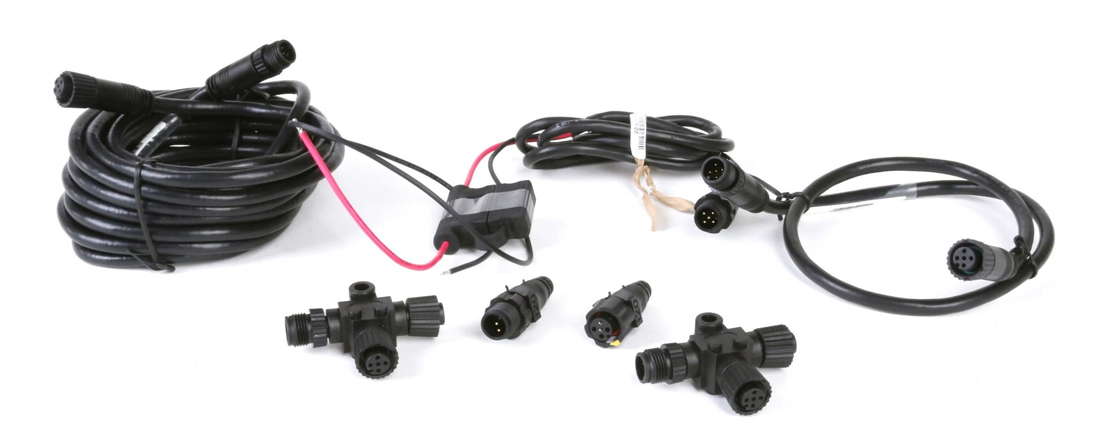
The network is built from T-connectors (T-pieces) installed along the backbone.
-
Devices and sensors plug into the bottom (drop port) of a T-connector.
-
Backbone cables connect to the sides of each T.
At the end of the backbone, the last T-connector will have:
-
a backbone cable on one side
-
a terminator plug on the other
This creates a properly closed network.
If all existing network ports are in use, simply add another T-connector.
You may also use soft T-connectors in tight spaces, functioning the same way as rigid T-connectors.
“Linear Architecture”
The NMEA 2000 network must be installed in a linear (straight-line) structure.
Every T-connector has:
-
1 female port
-
2 male ports
You may physically connect components in different ways, but only one preserves the required straight-line backbone.
Correct linear network → easy expansion and reliable operation
Incorrect branched layout → unclear network ends, improper termination, communication issues
Always maintain a straight backbone with devices connected only to the drop ports of T-connectors.
Adding a New Network Port or Device
You can add a T-connector at:
-
the end of the backbone
-
between existing T-connectors
-
between a T-connector and an extension cable
-
between two extension cables
Simply separate an existing connection and insert the new T-connector.
If adding a T-connector at the end:
-
Remove the terminator
-
Insert the new T-connector
-
Reattach the terminator to the new end
Factory-installed networks already include two terminators.
Extension Cables
Extension cables (various lengths available) allow you to mount devices where needed. They have male and female connectors and can be inserted at any point in the backbone.
Recommendations:
-
Total backbone length should not exceed 100 m
-
Do not use drop cables (device-to-T cables) longer than 5 m
Building a LowranceNET NMEA 2000 Network
If your boat does not already have an NMEA 2000 network, you must install one.
This guide explains how to do this using LowranceNET components.
The network is easy to build once you understand a few basics.
Power Connections
An NMEA 2000 network must be connected to a switched 12 V DC power source
(either behind the boat’s master switch or a panel switch).
Key points:
-
The size of the network or number of devices does not change this requirement
-
If a display and an LGC-2000 GPS module form a small network, you must power the network via the display’s NMEA 2000 power cable
-
A network should always be powered through a switch so you can turn it off (the bus draws current continuously when energized)
Never power an NMEA 2000 network from more than one device!
Lowrance displays with blue connectors include:
-
a main power cable
-
an NMEA 2000 power lead
Only one of the NMEA 2000 power leads in the network should be connected to the battery via a switch.
Incorrect dual power connections may cause:
-
cable overheating
-
device damage
-
risk of fire
Some OEM networks receive power through a:
-
dedicated powered terminator, or
-
powered T-connector
If your boat already has such a configuration, do not connect additional NMEA 2000 power cables.
Terminators
For correct operation, an NMEA 2000 network must be terminated with:
-
one 60-ohm terminator (small networks), or
-
two 120-ohm terminators (most networks)
Two termination resistors are used when the network includes three or more devices.
Tips:
-
Never add extra terminators to a functioning network
-
If using two 120-ohm terminators, place them at opposite ends of the backbone
A properly functioning network already has correct termination.
Adding a Device to an Existing Network
In an operating network:
-
You do not modify power
-
You do not modify terminators
Simply insert a new T-connector anywhere appropriate and connect the new device.
Connecting Devices to Non-Standard Networks (Micro-C)
Some boat manufacturers install Molex® Micro-C™ based networks.
Lowrance and other manufacturers offer adapter cables so that standard NMEA 2000 devices can connect to these Micro-C networks.
Future of NMEA 2000
NMEA 2000 was created to replace the older NMEA 0183 standard.
Over time, NMEA 0183 evolved so much that early version 1 devices became incompatible with newer version 3 devices.
To avoid repeating this fragmentation, NMEA developed a completely new, unified standard: NMEA 2000.
NMEA 2000 devices do not necessarily communicate with NMEA 0183 devices, nor is this expected.
Instead, it provides a consistent, future-proof system.
As more manufacturers adopt NMEA 2000, new sensors and modules—including engines capable of reporting detailed diagnostics—will increasingly rely on this standard.
By mid-2006, most major engine manufacturers were already producing NMEA 2000-compatible engines.